
“As organizations grow, employee training becomes more complex. Managing onboarding, compliance, professional development, and skills training across multiple departments and locations requires more than traditional training methods. An enterprise LMS provides a centralized platform that helps organizations deliver, manage, and measure workforce learning at scale.
For Chief Human Resources Officers (CHROs), Learning and Development (L&D) Directors, IT leaders, and procurement teams, choosing the right platform is a strategic investment. The goal is not simply to deliver courses but to improve employee performance, reduce administrative costs, and connect learning initiatives with measurable business outcomes.” – Stephen Handisides
What Is an Enterprise Learning Management System?
An enterprise learning management system is software designed to manage employee training and development across large or complex organizations. It allows administrators to create or upload courses, assign learning activities, monitor employee progress, and generate reports from a centralized location.
Unlike standalone training tools, enterprise platforms often support multiple departments, business units, geographic regions, and user groups. They can also integrate with existing HR systems, identity management tools, and other business applications.
For example, a multinational company can use one platform to deliver compliance training to its headquarters, product training to its sales teams, and technical development programs to its IT department. Each group receives relevant learning content while leadership maintains visibility into overall training performance.
How Enterprise LMS Platforms Differ From Traditional Learning Management Systems
Traditional learning management systems may work well for small teams with straightforward training needs. However, organizations with thousands of employees often require more advanced administrative controls, integrations, analytics, and scalability.
An enterprise LMS typically offers more sophisticated user management, automated enrollment, role-based learning paths, multilingual capabilities, and consolidated reporting. It may also support separate business units with different learning requirements while maintaining centralized oversight.
Another important difference is integration. Enterprise platforms are often expected to exchange data with human resource information systems (HRIS), single sign-on (SSO) solutions, customer relationship management (CRM) software, and other enterprise applications.
These capabilities help reduce manual work and improve data consistency. Rather than maintaining separate spreadsheets for training completion, HR teams can use centralized reporting to monitor employee progress and identify compliance gaps.
When evaluating the best enterprise LMS software, organizations should look beyond the number of features. The real question is whether the platform can support their operating model, technology environment, and long-term workforce development strategy.
Why Scaled Organizations Need a Centralized Learning Infrastructure
As a business expands, inconsistent training can create operational risks. Different locations may deliver onboarding differently, managers may track employee progress using separate tools, and critical updates may not reach every team on time.
A centralized learning infrastructure addresses these challenges by providing a consistent system for distributing training content, assigning courses, and measuring results.
For HR and L&D leaders, centralization makes it easier to standardize training requirements while allowing departments to deliver role-specific learning. Employees can access relevant resources from a common platform, and managers can review progress without requesting reports from multiple locations.
Centralization also supports organizational agility. When a company introduces a new policy, product, or process, administrators can distribute updated training across relevant employee groups more efficiently.
For global organizations, a well-designed enterprise learning management system can accommodate regional requirements, different languages, and varying training schedules. This creates a more consistent employee experience without requiring every location to operate independently.
Key Challenges an Enterprise LMS Should Solve
Before investing in a platform, organizations should identify the problems they expect the software to address. A successful implementation should solve practical business challenges rather than simply digitize existing training materials.
Common challenges include:
- Administrative workload: Automating enrollment, reminders, and completion tracking reduces repetitive work for HR and training teams.
- Inconsistent training delivery: Standardized learning paths help ensure employees receive the appropriate training across departments and locations.
- Limited visibility: Dashboards and reports give decision-makers a clearer view of participation, completion rates, and knowledge gaps.
- Compliance risks: Automated assignments, assessment records, and certification tracking help organizations monitor required training.
- Disconnected systems: Integrations reduce duplicate data entry and improve coordination between HR, IT, and learning teams.
- Difficulty measuring results: Learning analytics help connect training participation with skills development and business performance.
The right platform should address these challenges in ways that can be measured over time.
Understanding Enterprise LMS Requirements Before Buying
Selecting an LMS without clearly defined requirements can lead to unnecessary costs, poor adoption, and expensive customization. Before comparing vendors, organizations should establish what the platform must accomplish, who will use it, and how its success will be measured.
Identify Organizational Learning and Development Goals
Start by connecting learning initiatives to business priorities. These might include improving employee productivity, accelerating onboarding, reducing compliance violations, developing leadership capabilities, or preparing teams for new technology.
Each goal should have a measurable outcome. For example, if the organization wants to shorten onboarding, establish the current time required for new hires to become productive and set a realistic improvement target.
Clear objectives help decision-makers prioritize features and evaluate whether a proposed LMS delivers meaningful value.
Assess Workforce Size, Geographic Distribution, and Training Complexity
Determine how many employees, contractors, partners, or customers may need access to the platform. Consider current enrollment and projected growth over the next three to five years.
Geographic distribution also matters. A company operating across multiple countries may need multilingual interfaces, regional administration, time-zone flexibility, and reliable access for remote employees.
Training complexity should be assessed alongside workforce size. An organization with strict compliance requirements may need detailed audit trails and certification management, while a distributed sales organization may prioritize product training and performance reporting.
Map Employee Training Needs Across Departments and Job Roles
Different teams require different learning experiences. HR employees may need policy and onboarding modules, while sales representatives require product knowledge and customer engagement training.
Create a training matrix that maps each department and job role to its mandatory courses, recommended skills development, certifications, and assessment requirements.
This exercise helps identify whether the LMS supports role-based learning paths, departmental permissions, and targeted course assignments.
Evaluate Current Training Processes, Technology, and Performance Gaps
Review existing training methods, tools, reporting practices, and administrative workflows. Identify where employees experience delays, managers lack visibility, or training records require manual updates.
Gather feedback from learners, administrators, managers, IT teams, and compliance stakeholders. Their input can reveal requirements that may otherwise be overlooked during vendor demonstrations.
Define Short-Term Requirements and Long-Term Scalability Goals
Separate essential launch requirements from capabilities that may become important later.
Short-term priorities might include employee onboarding, compliance tracking, HRIS integration, and basic reporting. Long-term needs could include AI-powered recommendations, expanded external-user training, advanced analytics, or support for additional business units.
This approach helps organizations avoid both underbuying and paying for unnecessary capabilities.
Essential Enterprise LMS Features to Evaluate
The best enterprise learning management system should combine practical learning tools with administrative efficiency, reliable reporting, and a strong learner experience.
Centralized Course Management and Content Administration
Look for a single location to organize courses, manage learning materials, control versions, and distribute updated content. Permissions should allow appropriate teams to manage their own training without compromising organization-wide standards.
Automated Employee Enrollment, Assignments, and Reminders
Automation should support course assignments based on role, department, location, hiring date, or compliance requirements. Automated reminders and escalation rules can help reduce overdue training and manual follow-ups.
Role-Based Learning Paths and Personalized Training Programs
Learning paths should group courses into structured programs based on job responsibilities, skill levels, or career goals. Personalization helps employees focus on relevant training rather than navigating a large, undifferentiated course library.
Assessments, Quizzes, Certifications, and Skills Verification
Evaluate whether the LMS supports configurable assessments, passing thresholds, completion criteria, certification expiration dates, and retraining requirements. Practical skills verification may also be necessary for roles that require demonstrated competence.
Progress Tracking, Completion Reports, and Learning Analytics
Administrators should be able to monitor enrollment, completion, assessment results, overdue courses, and certification status. Customizable dashboards help executives and managers identify training gaps and make informed decisions.
Mobile Learning and Flexible Access Across Devices
Mobile-responsive design enables employees to complete training using smartphones, tablets, or computers. For distributed workforces, flexible access can improve convenience and make learning easier to fit into busy schedules.
Multilingual Content and Support for Distributed Workforces
Organizations operating internationally should evaluate language support, localized content, regional administration, and reporting across business units. Confirm whether translation tools and multilingual course versions are included or require additional services.
Social Learning, Collaboration, and Knowledge Sharing
Discussion spaces, peer feedback, shared resources, and collaborative learning activities can help employees learn from colleagues and subject matter experts. These tools are particularly useful when teams work across different locations.
AI-Powered Learning Recommendations and Adaptive Learning Capabilities
AI-enabled features may recommend courses based on job roles, learning history, or identified skill gaps. Adaptive learning can adjust content or assessment difficulty based on learner performance.
Organizations should also evaluate data privacy, recommendation transparency, and administrative controls before adopting AI-driven features.
Enterprise LMS Architecture and Technical Requirements
An LMS must fit the organization’s technical environment while delivering reliable performance and protecting sensitive information.
Cloud-Based vs. Self-Hosted LMS Architecture
Cloud-based platforms typically reduce infrastructure maintenance and simplify vendor-managed updates. Self-hosted systems offer greater control over infrastructure but require internal resources for maintenance, security, and upgrades.
The right option depends on IT capacity, data governance requirements, customization needs, and total cost of ownership.
Single-Tenant vs. Multi-Tenant Deployment Models
A single-tenant deployment generally provides a dedicated application environment for one customer, while a multi-tenant platform serves multiple customers through shared infrastructure with logical separation.
Single tenancy may offer more isolation and configuration flexibility. Multi-tenancy can simplify maintenance and reduce costs. However, actual security depends on the vendor’s implementation, not tenancy alone.
Monolithic vs. Modular and API-Driven Architectures
Monolithic systems package many functions into a single application, whereas modular architectures separate components and may allow more flexible integration or expansion.
API-driven platforms can make it easier to connect the LMS with other business systems. Ask vendors about API limits, documentation, versioning, and support for future integrations.
Scalability, System Performance, and Concurrent User Capacity
Confirm that the system can support projected user growth and peak training periods. Request performance information for concurrent users, reporting workloads, and large content deployments rather than relying on total registered-user counts alone.
High Availability, Backup Strategies, and Disaster Recovery
Review uptime commitments, backup frequency, recovery time objectives (RTO), and recovery point objectives (RPO). Ask how the vendor restores service and protects learning records after an outage or data-loss event.
Content Delivery and Performance Across Global Locations
Global organizations should assess content loading speeds, regional infrastructure, and content delivery network capabilities. Test access from representative locations and devices before committing to a platform.
Configuration, Customization, and Upgrade Flexibility
Prioritize configurable workflows, branding, permissions, and reporting. Extensive custom development can increase maintenance costs and complicate upgrades, so confirm which changes administrators can make without vendor intervention.
Integration Capabilities Within the Enterprise Technology Stack
An enterprise LMS should work as part of the organization’s broader technology ecosystem, not as an isolated application.
Connecting the LMS With Human Resource Information Systems (HRIS)
HRIS integration can synchronize employee records, job roles, departments, and employment status. This helps automate enrollment and remove access when employees leave, subject to the organization’s identity and access policies.
Integrating Single Sign-On (SSO) and Enterprise Identity Management
SSO enables employees to access the LMS through an approved organizational identity. Evaluate support for relevant authentication standards, multifactor authentication, role provisioning, and access controls.
Connecting Customer Relationship Management (CRM) and Enterprise Resource Planning (ERP) Systems
CRM integration can support sales enablement and customer-facing training, while ERP integration may help align learning with operational processes or workforce planning.
Supporting Webhooks, APIs, and Automated Data Synchronization
APIs and webhooks allow systems to exchange information and trigger workflows. Confirm authentication methods, rate limits, error handling, monitoring, and integration support.
Integrating Content Authoring Tools and Third-Party Learning Libraries
Check compatibility with existing authoring tools, content repositories, and external learning libraries. Confirm licensing terms and whether imported content retains assessments, tracking, and completion data.
Evaluating Standards Such as SCORM, xAPI, and LTI
SCORM supports standardized course packaging and tracking. xAPI can capture a broader range of learning experiences, while LTI enables connections between learning platforms and external educational tools. Choose standards based on your content strategy, reporting requirements, and integration roadmap.
Enterprise LMS Security, Privacy, and Compliance
Security and compliance are essential considerations when selecting an enterprise LMS. Large organizations manage employee records, assessment results, certification histories, and other potentially sensitive information. A platform must protect this data while giving authorized employees, managers, and administrators appropriate access.
For enterprise IT leaders, the goal is to evaluate whether the learning platform aligns with internal security policies, regulatory obligations, and business continuity requirements.
User Authentication, Role-Based Access Control, and Permission Management
An enterprise LMS should provide secure authentication and granular permission controls. Role-based access control (RBAC) allows administrators to assign permissions according to responsibilities, such as learner, instructor, department manager, or system administrator.
For example, a department manager may need access to training completion reports for their team but should not automatically see employee records from other departments. Central administrators may require broader access, while sensitive configuration settings should remain restricted to designated personnel.
Look for support for single sign-on (SSO), multifactor authentication (MFA), automated user provisioning, and regular access reviews. These controls help reduce unauthorized access and simplify account management across a large workforce.
Data Encryption, Secure Storage, and Data Retention Policies
Ask vendors how they protect data both in transit and at rest. Encryption, secure hosting environments, controlled access to databases, and appropriate key management practices help reduce the risk of unauthorized disclosure.
Data retention is equally important. Organizations should establish how long training records, assessment results, and certification evidence must be stored and when information should be archived or deleted.
The LMS should support the organization’s retention requirements and provide clear documentation about backups, deletion procedures, data exports, and storage locations. IT and compliance teams should verify these capabilities rather than relying solely on general statements about security.
Audit Trails, Activity Logs, and Administrative Accountability
Audit trails help organizations establish what happened, when it happened, and which account performed an action. Depending on the platform, logs may record course completions, assessment attempts, certification changes, permission updates, and administrative activity.
These records can support internal investigations, compliance reviews, and external audits. Look for searchable logs, export capabilities, timestamps, appropriate access restrictions, and defined retention periods.
For regulated organizations, confirm whether audit records are sufficiently detailed to meet applicable requirements. An LMS audit trail can support accountability, but it does not automatically establish compliance with every regulation or industry standard.
Evaluating Privacy Requirements and Regional Data Protection Laws
Organizations operating across countries must consider the privacy laws applicable to their employees and business operations. Depending on the circumstances, these may include the European Union’s General Data Protection Regulation (GDPR), the California Consumer Privacy Act as amended by the California Privacy Rights Act (CCPA/CPRA), and other national or regional data protection laws.
Evaluate where data is stored, who can access it, how subprocessors are managed, and whether the vendor provides appropriate contractual protections. Also review data processing agreements, cross-border transfers, employee privacy notices, and procedures for responding to data access or deletion requests.
Legal and privacy teams should determine which requirements apply to the organization. Vendor certifications and security documentation are useful evidence, but they should be assessed alongside actual platform capabilities and contractual commitments.
Compliance Training, Certification Expiration, and Evidence Tracking
An enterprise LMS should help organizations assign mandatory training, track completion, and manage certification renewals. Automated reminders and escalation workflows can notify employees and managers when deadlines approach or requirements remain incomplete.
For example, a company may require annual information security training and role-specific safety courses. The platform should make it easy to identify employees who have completed the requirements and those who need additional action.
Look for timestamped completion records, assessment results, downloadable reports, expiration alerts, and support for retraining cycles. These features strengthen compliance oversight while reducing the administrative effort involved in maintaining accurate records.
Vendor Security Assessments, Incident Response, and Business Continuity
Before signing a contract, review the vendor’s security controls, independent assessment reports, vulnerability management practices, and incident response procedures. Depending on the organization’s risk profile, relevant evidence may include SOC 2 reports, ISO 27001 certification, penetration testing summaries, and documented access controls.
Ask how the vendor detects incidents, communicates security events, investigates breaches, and restores service after an outage. Contractual commitments should clarify notification procedures, responsibilities, and support expectations.
Business continuity also matters. Review backup frequency, disaster recovery arrangements, service availability commitments, and recovery objectives. A trustworthy vendor should be able to explain how it protects both platform availability and the integrity of training records.
Multi-Department and Multi-Location Learning Management
Large organizations rarely have identical training needs across every team or location. A successful enterprise learning management system should support consistent organizational standards while allowing departments and regions to manage relevant differences.
Managing Multiple Business Units Within One LMS
A centralized platform can support multiple subsidiaries, business units, regional offices, or brands under one administrative structure. Each unit may need its own courses, administrators, reporting views, and learning requirements.
When evaluating this capability, ask whether the LMS supports organizational hierarchies, separate learning catalogs, group-based permissions, and consolidated executive reporting.
This structure helps leadership maintain oversight without forcing every business unit to operate independently. It can also reduce duplicated software costs and simplify organization-wide training initiatives.
Supporting Different Training Requirements Across Departments
Training requirements vary according to job responsibilities. Finance teams may need fraud prevention and financial controls training, while customer support teams may require communication and product knowledge modules. Technical teams may need specialized certifications or hands-on learning programs.
The LMS should allow administrators to assign learning by department, job role, location, and other relevant attributes. Automated rules can ensure employees receive required training when they join a team or move into a new position.
This flexibility improves relevance and reduces the risk of employees receiving unnecessary assignments while missing important requirements.
Standardizing Training While Allowing Local Customization
Centralized standards help maintain consistent policies, processes, and brand expectations. However, regional teams may need to adapt examples, language, schedules, or learning materials to local operating conditions.
Look for features that allow approved shared content to coexist with region-specific modules. Version control and approval workflows are especially valuable because they help prevent outdated or unauthorized materials from circulating.
A balanced approach allows headquarters to maintain governance while giving local teams enough flexibility to address their workforce’s needs.
Managing Franchisees, Contractors, Partners, and External Learners
Some organizations need to train people who are not direct employees. These groups may include franchise owners, contractors, distributors, suppliers, and business partners.
An LMS that supports external learners can help deliver product training, operational procedures, brand standards, and compliance education beyond the internal workforce.
Evaluate external-user licensing, registration workflows, access expiration, separate learning portals, and reporting by partner organization. Clear access boundaries are important when external learners should not see internal employee information or confidential courses.
Establishing Centralized Governance and Distributed Administration
Centralized governance defines organization-wide learning standards, security rules, reporting expectations, and content approval processes. Distributed administration allows qualified managers to handle routine training tasks within their own teams.
For example, a central L&D team might approve mandatory compliance courses, while regional administrators assign them and follow up on overdue completions.
The LMS should support delegated permissions, clear ownership, approval workflows, and consistent reporting. This model reduces administrative bottlenecks without sacrificing oversight.
Enterprise LMS Content Strategy and Learning Experience
Even a feature-rich platform can underperform if its content is outdated, difficult to navigate, or disconnected from employee needs. Organizations should evaluate both content management capabilities and the experience employees will have when completing training.
Building a Reusable Enterprise Learning Content Library
A centralized content library helps teams organize and reuse approved training materials across departments and locations. Content can be categorized by topic, job role, skill, business unit, or compliance requirement.
Reusable resources reduce duplicated development work and make it easier to maintain consistent training standards. Search tools, metadata, version histories, and content ownership fields help administrators locate and manage materials efficiently.
Converting Existing Training Materials Into Digital Learning Modules
Many organizations already have slide decks, recorded presentations, policy documents, manuals, and instructor-led courses. Converting suitable materials into digital modules can accelerate implementation and preserve existing institutional knowledge.
However, digitization should involve more than uploading files. Review each resource for accuracy, accessibility, relevance, and opportunities for interaction or assessment.
Prioritize high-impact materials first, particularly mandatory training and programs that currently require significant instructor or administrative time.
Supporting Instructor-Led, Virtual, and Self-Paced Training
Different learning objectives call for different delivery methods. Some topics work well as self-paced modules, while practical skills development may require instructor-led sessions, live virtual workshops, or supervised demonstrations.
The platform should support the delivery formats your organization uses and, where necessary, manage registrations, attendance, assessments, and completion records across them.
A blended learning approach can combine flexible digital learning with instructor guidance and practical application.
Designing Competency-Based Learning Paths and Skills Development Programs
Competency-based learning focuses on the knowledge and skills employees need to perform specific responsibilities. Instead of assigning courses without a clear purpose, organizations map learning activities to defined competencies and proficiency levels.
For example, a leadership development path might combine communication training, decision-making scenarios, and a practical assessment. Managers can then use the results to identify development needs and plan additional coaching.
Choose an LMS that supports structured learning paths, prerequisite rules, skill assessments, and progress tracking.
Improving Learner Engagement Through Interactive Content and Gamification
Interactive scenarios, knowledge checks, simulations, discussion activities, and short learning modules can make training more engaging. Gamification elements such as badges, points, and progress indicators may also encourage participation when they reinforce meaningful learning goals.
These features should support understanding rather than distract from it. Organizations should evaluate whether employees can easily navigate courses, resume learning, and access content using their preferred devices.
Learner feedback and completion data can help L&D teams identify where content needs improvement.
Keeping Training Content Accurate, Relevant, and Up to Date
Outdated training can create confusion, inconsistent practices, and compliance risks. Organizations should assign content owners, establish review schedules, and define approval procedures for important learning materials.
Version control is particularly valuable when policies, product specifications, or regulatory requirements change. Administrators should be able to identify affected courses, publish approved revisions, and determine whether employees need to complete updated training.
Regular content reviews help ensure the learning library remains useful as the organization evolves.
Enterprise LMS Reporting, Analytics, and Performance Measurement
An enterprise LMS should help leaders understand whether training is producing meaningful results. Course completion numbers are useful, but they do not tell the entire story. Organizations also need to measure knowledge retention, skills development, and the relationship between learning and business performance.
Tracking Enrollment, Completion Rates, and Assessment Results
Start with foundational learning metrics, including enrollment, completion rates, assessment scores, overdue assignments, and certification status.
Completion rate can be calculated as:

For example, if 900 out of 1,000 assigned employees complete mandatory training, the completion rate is 90%.
An LMS should allow administrators to filter results by department, location, job role, and course. These views help managers identify overdue assignments and determine where additional support is needed.
Measuring Knowledge Retention and Skills Proficiency
Completing a course does not necessarily mean an employee has retained the information or can apply it at work.
Organizations can measure knowledge retention through follow-up assessments, while practical evaluations can help determine whether employees demonstrate the required skills.
For example, a company might assess employees immediately after training and again 30 or 60 days later. Comparing results can reveal whether employees retain essential knowledge over time.
For skills-based roles, consider practical demonstrations, manager evaluations, or supervised assessments alongside online quizzes.
Identifying Training Gaps Across Teams and Locations
Learning analytics can reveal patterns that are difficult to identify through isolated reports. One department may consistently achieve high assessment scores, while another struggles with the same material.
These differences can indicate a need for revised content, additional coaching, or more accessible training delivery.
An enterprise learning management system should make it easy to compare results across business units while respecting data access permissions. Leaders can then prioritize interventions based on evidence rather than assumptions.
Connecting Learning Outcomes With Employee Performance Metrics
To demonstrate business impact, connect learning data with relevant operational measures.
Depending on the training objective, these measures may include time to productivity, sales conversion rates, customer satisfaction, error rates, quality scores, or safety incidents.
For example, a customer service organization could compare the performance of employees before and after completing a product training program. However, improvements should not automatically be attributed to training alone. Staffing changes, new processes, and other factors may also influence results.
Where possible, use baseline measurements and comparison groups to strengthen the analysis.
Building Executive Dashboards for Learning and Development Leaders
Executives need concise reporting that connects learning activity with organizational priorities. Instead of presenting hundreds of course-level metrics, dashboards should highlight the indicators that influence decisions.
Useful executive metrics may include:
- Mandatory training completion and overdue requirements.
- Training expenditure per employee.
- Time required to complete onboarding.
- Assessment performance and skills gaps.
- Certification status and upcoming renewals.
- Progress toward workforce development targets.
- Estimated savings and productivity improvements.
The best enterprise LMS software should provide configurable dashboards, scheduled reports, and data export capabilities. These features help HR, finance, compliance, and business leaders access relevant information without relying on manual spreadsheet consolidation.
Using Predictive Analytics to Identify Future Training Needs
Predictive analytics can help organizations identify potential skill shortages, forecast upcoming training demand, and determine which employee groups may need additional support.
For example, workforce planning data may indicate that a business unit will need more employees with specific technical skills over the next year. Learning leaders can use this information to plan development programs before the gap becomes an operational problem.
AI-driven predictions should be treated as decision-support tools rather than unquestionable conclusions. Organizations should assess data quality, explainability, privacy, and potential bias before using predictions to influence employee development decisions.
Calculating Enterprise LMS Costs and Total Cost of Ownership
The subscription price is only one part of an enterprise LMS investment. Implementation, integration, content development, employee onboarding, internal administration, and ongoing support can significantly affect the total cost.
Procurement officers and finance teams should compare vendors using a consistent total cost of ownership (TCO) model. This creates a more realistic basis for budgeting and helps prevent unexpected expenses after implementation.
Comparing Per-User, Active-User, Subscription, and Enterprise Licensing Models
LMS vendors use different pricing structures, so organizations should understand what triggers additional charges.
Common models include:
- Per-user pricing: Charges are based on the number of registered or licensed users.
- Active-user pricing: Charges depend on the number of users who access the platform during a defined period.
- Subscription pricing: A recurring fee provides access to an agreed set of features, users, or usage limits.
- Enterprise licensing: A negotiated agreement may bundle user access, integrations, support, and advanced capabilities.
Each model has trade-offs. Active-user pricing may suit organizations with seasonal training needs, while per-user pricing can provide predictability when workforce participation is consistent.
Request pricing scenarios based on current headcount, projected growth, and peak usage. Confirm how inactive users, contractors, external learners, and additional business units affect the bill.
Accounting for Implementation, Configuration, and Migration Costs
Implementation costs can include platform configuration, organizational setup, user provisioning, data migration, testing, project management, and administrator training.
Migrating from an existing LMS may require transferring course materials, employee records, completion histories, and certification data. Older content may need conversion or manual validation before it works correctly in the new environment.
Ask vendors for a detailed implementation estimate that identifies included services, assumptions, exclusions, and potential change-order fees.
Estimating Content Development and Third-Party Integration Expenses
Existing training materials may require redesign to improve accessibility, engagement, or compatibility with the new platform. New courses may also require instructional design, multimedia production, assessments, and subject matter expert reviews.
Integration costs can include API development, middleware, testing, ongoing maintenance, and specialist support.
Create an inventory of existing content and required integrations before requesting proposals. This helps vendors estimate the actual project scope instead of providing a price based on incomplete assumptions.
Evaluating Ongoing Support, Maintenance, and Administration Costs
Recurring expenses extend beyond the software subscription. Organizations may need dedicated LMS administrators, instructional designers, technical support, and resources to review training content.
Also evaluate the vendor’s support arrangements, service-level agreements, upgrade policies, and fees for premium assistance.
Internal labor should be included in the financial model even when employees already work for the organization. Their time represents a real operational cost that may otherwise be overlooked.
Identifying Hidden Fees for Storage, Premium Features, and Additional Users
Request written clarification about charges for additional storage, advanced analytics, AI features, API usage, external learners, premium support, and expanded reporting.
Also review annual price increases, minimum user commitments, renewal conditions, data export fees, and contract termination terms.
A low introductory price may become expensive if essential capabilities require upgrades or if the organization grows beyond its original licensing tier. Ask each vendor to document exclusions and provide pricing for expected growth.
Calculating Total Cost of Ownership Over Three to Five Years
A three-to-five-year model helps organizations compare the full financial commitment of different LMS options.
Use the following formula:
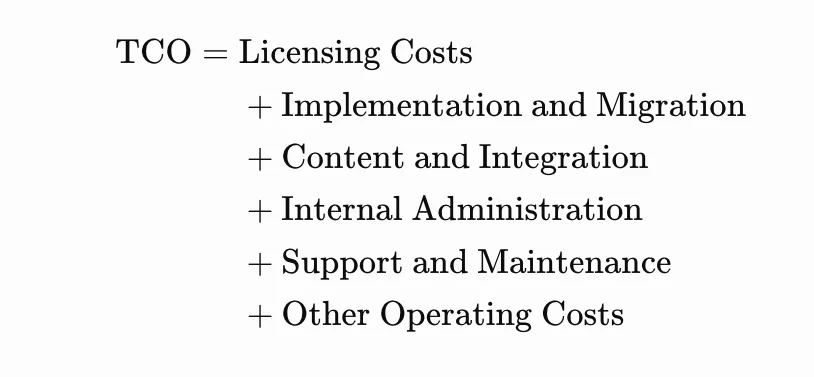
For example, consider an illustrative three-year investment:
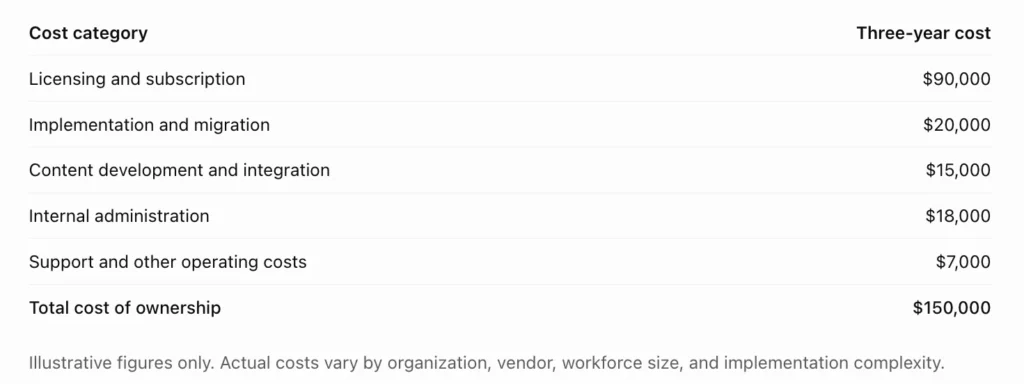
Illustrative figures only. Actual costs vary by organization, vendor, workforce size, and implementation complexity.
Compare this total against the expected financial benefits, including reduced administrative work, lower travel and instructor expenses, and measurable productivity improvements. Use the same time horizon and cost assumptions for every vendor.
A structured TCO model gives procurement teams a more defensible basis for comparing proposals and helps executives understand the full investment before committing.
Running Enterprise LMS Demos, Trials, and Proofs of Concept
Choosing an enterprise LMS based on a sales presentation alone can be risky. A platform may look impressive during a demonstration but fail to support your actual workflows, integrations, or reporting requirements. Before signing a contract, conduct structured demonstrations, hands-on trials, or a proof of concept (PoC) to verify that the system meets your organization’s needs.
Preparing Realistic Use Cases for Vendor Demonstrations
Prepare a list of realistic scenarios that reflect your organization’s daily training activities. These might include onboarding new employees, assigning mandatory compliance courses, managing certifications, and generating reports for multiple departments.
Ask vendors to demonstrate these workflows using your requirements rather than relying entirely on prepared presentations. For example, request a demonstration of how the platform assigns training automatically when an employee changes roles.
This approach helps decision-makers assess whether the software solves real operational problems.
Testing User Provisioning, Enrollment Automation, and Reporting
Test how the LMS creates user accounts, updates employee information, assigns courses, and manages departing employees. If the platform integrates with an HRIS, verify whether changes to employee records trigger the expected learning workflows.
Evaluate reporting capabilities as well. Can managers quickly identify overdue courses? Can administrators export certification records? Can executives compare completion rates across locations?
These practical tests help determine whether the enterprise learning management system will reduce administrative work or introduce additional manual processes.
Validating Integrations With Existing Enterprise Systems
An LMS should work reliably with your existing technology stack. During the evaluation, test integrations with systems such as your HRIS, SSO provider, CRM, and content authoring tools.
Confirm that employee data synchronizes correctly, permissions are maintained, and errors can be identified and resolved. Ask IT teams to assess API documentation, authentication methods, integration monitoring, and vendor support.
A successful demonstration should establish that the proposed platform fits your technical environment without requiring excessive customization.
Testing Performance Under Expected User Loads
A platform that works well for a small test group may struggle during organization-wide training campaigns.
Ask vendors how they validate performance under concurrent user loads. Where possible, conduct load testing in an approved test environment to evaluate login response times, course loading, assessment submission, and reporting performance.
Test scenarios should reflect expected peak usage, such as thousands of employees accessing annual compliance training near a deadline.
Gathering Feedback From Administrators, Managers, and Learners
Include representatives from HR, IT, procurement, compliance, and different employee groups in the evaluation process.
Administrators can assess configuration and reporting, managers can evaluate team oversight, and learners can provide feedback on navigation and accessibility.
Use a standardized scorecard to compare vendors consistently. This reduces the risk of selecting a platform based primarily on executive preference or an attractive user interface.
Establishing Pass-or-Fail Criteria Before the Proof of Concept
Define mandatory requirements before testing begins. These may include successful SSO integration, accurate reporting, acceptable performance, required security controls, and support for essential training workflows.
For example, an LMS that cannot meet a mandatory data protection requirement should not receive a high overall score simply because it offers advanced features.
Establishing pass-or-fail criteria early creates a transparent selection process and makes the final decision easier to justify to stakeholders.
Enterprise LMS Implementation and Deployment Planning
Selecting the right platform is only the beginning. A successful implementation requires clear ownership, realistic timelines, reliable data migration, and coordination between business and technical teams.
Building a Cross-Functional Implementation Team
Create a team that includes L&D, HR, IT, information security, procurement, compliance, and representatives from major business units.
Assign clear responsibilities for project decisions, technical configuration, content migration, testing, communications, and user support.
Involving stakeholders early helps identify dependencies and reduces the likelihood of discovering critical requirements shortly before launch.
Defining Project Scope, Milestones, Budget, and Ownership
Document the implementation objectives, deliverables, timeline, budget, and success criteria. Identify which courses, departments, integrations, and user groups are included in the initial rollout.
Break the project into milestones, such as requirements approval, configuration, migration, testing, pilot launch, and organization-wide deployment.
Assign an owner to each milestone and establish a process for managing scope changes. This helps prevent delays and unexpected expenses.
Migrating Legacy Courses, Learner Records, and Certifications
Before migration, audit existing training materials and records. Identify outdated courses, duplicate content, incomplete employee records, and certifications that must be preserved.
Create a migration plan that defines data formats, validation procedures, ownership, and acceptance criteria. Test representative records before transferring the full dataset.
After migration, reconcile record counts and verify that course completions, assessment results, and certification dates have been transferred accurately.
Configuring Roles, Permissions, Learning Paths, and Integrations
Configure the organizational hierarchy, user groups, access permissions, course assignments, and reporting structure.
Set up integrations with HRIS, SSO, and other required systems, then test the complete workflow from employee provisioning to course completion and reporting.
Avoid unnecessary customization during the initial deployment. Prioritize essential functionality and introduce additional features when they deliver clear business value.
Conducting User Acceptance Testing and Security Validation
User acceptance testing (UAT) confirms that the platform supports real business workflows before launch.
Test scenarios should cover enrollment, assessments, completion records, permissions, reporting, and integrations. IT and security teams should separately validate authentication, access restrictions, data handling, and relevant security requirements.
Document defects, assign owners, and establish clear criteria for resolving critical issues before production deployment.
Launching Through a Pilot Program or Phased Rollout
A pilot allows a selected group to test the platform before it reaches the entire organization. Choose participants who represent different departments, locations, and levels of technical experience.
Use pilot feedback to improve workflows, content, communications, and support resources.
For complex organizations, a phased rollout may be more manageable than a single company-wide launch. For example, deployment might begin with headquarters before expanding to regional offices and external partners.
Training Administrators, Managers, and Employees on the New Platform
Administrators need practical training in user management, course configuration, reporting, and troubleshooting. Managers should understand how to monitor team progress and follow up on overdue requirements.
Employees need simple instructions for logging in, finding courses, completing assessments, and requesting assistance.
Provide quick-start guides, short demonstrations, and accessible support resources. Role-specific training helps users become comfortable with the platform and reduces avoidable support requests.
Change Management and Enterprise LMS Adoption
Even a well-implemented platform can underperform if employees do not understand its purpose or find it difficult to use. Change management helps organizations establish new learning habits and achieve the intended benefits of their LMS investment.
Communicating the Purpose and Benefits of the New LMS
Explain why the organization is introducing the platform and how it will improve the employee experience.
Highlight practical benefits such as easier access to training, clearer development opportunities, fewer manual processes, and more transparent certification requirements.
Communications should be tailored to different audiences. Executives may care about performance and compliance, while employees may be more interested in convenient access and relevant learning opportunities.
Securing Leadership Sponsorship and Manager Participation
Leadership sponsorship demonstrates that learning is an organizational priority rather than an administrative requirement.
Executives can communicate strategic objectives, while managers reinforce participation by allocating time for training and discussing development goals during team meetings.
When leaders and managers actively support the initiative, employees are more likely to treat learning as part of their regular work.
Reducing Resistance to New Training Processes
Employees may resist a new LMS if they perceive it as complicated, time-consuming, or unrelated to their responsibilities.
Address these concerns through early communication, demonstrations, user feedback, and accessible learning resources. Where possible, involve employees in pilot testing and explain how their feedback influences improvements.
Keep mandatory workflows straightforward and avoid assigning irrelevant courses. A user-friendly experience can make adoption easier.
Providing Ongoing Learner Support and Technical Assistance
Establish clear support channels for login problems, course access issues, technical errors, and questions about training requirements.
Support may include a help center, internal service desk, frequently asked questions, and designated LMS champions within departments.
Monitor recurring issues and use them to improve training materials or system configuration rather than repeatedly addressing the same problems manually.
Using Adoption Metrics to Improve the Learning Experience
Track adoption using measures such as active users, course starts, completion rates, support requests, learner satisfaction, and time to complete training.
Review these indicators by department and location to identify groups that may need additional assistance.
Avoid treating login frequency as proof of learning effectiveness. Combine adoption data with assessment results, skills verification, and relevant performance indicators to understand whether the platform is delivering value.
Building a Future-Ready Enterprise Learning Strategy
An enterprise LMS should support today’s workforce requirements while allowing the organization to adapt as technology, business priorities, and employee skills evolve.
Preparing for AI-Assisted Training and Personalized Learning
AI-enabled capabilities can recommend relevant courses, identify potential skill gaps, and help employees navigate large content libraries.
Organizations should evaluate these features based on their usefulness, accuracy, privacy protections, and administrative controls. AI recommendations should support informed learning decisions rather than replace human judgment.
A future-ready strategy also considers how AI-generated content will be reviewed for accuracy, accessibility, and alignment with company policies.
Supporting Skills-Based Workforce Planning and Internal Mobility
Skills-based workforce planning connects employee capabilities with current and future business needs.
An LMS can support this approach through competency frameworks, skills assessments, targeted development paths, and records of completed learning. When combined with workforce planning data, these capabilities can help organizations identify employees who may be ready for new responsibilities.
This supports internal mobility and may reduce reliance on external recruitment for skills that can be developed internally.
Expanding Learning Access Across Employees and External Partners
Organizations may eventually need to train contractors, franchisees, suppliers, customers, or distribution partners alongside employees.
Choose a platform that can accommodate these audiences while maintaining appropriate access controls, licensing arrangements, and reporting boundaries.
Expanding access can help organizations deliver consistent product knowledge, operational guidance, and partner education without creating separate, disconnected training systems.
Establishing Continuous Improvement Through Learning Analytics
Use learning data to identify underperforming courses, recurring skills gaps, and opportunities to improve training delivery.
Establish regular reviews involving L&D, department managers, and relevant business stakeholders. Review progress against agreed targets and update learning programs when results fall short.
Continuous improvement turns the LMS from a course delivery tool into a platform for ongoing workforce development.
Aligning LMS Investments With Long-Term Business Strategy
The LMS roadmap should reflect the organization’s broader priorities, such as entering new markets, adopting new technologies, improving customer experience, or meeting evolving compliance requirements.
Review the platform’s capabilities, costs, and adoption metrics periodically. This helps leadership determine whether the existing system remains suitable or requires additional integrations, expanded licensing, or new functionality.
A future-ready enterprise learning management system should evolve with the business rather than become another technology platform that requires replacement after a few years.
Summary: How to Choose the Best Enterprise LMS for Your Organization
Choosing the best enterprise LMS software requires a balanced assessment of business requirements, technical capabilities, security, usability, and long-term financial value. The strongest option is not necessarily the platform with the most features, but the one that addresses your organization’s priorities and can demonstrate measurable results.
Prioritize Business Requirements, Scalability, and Integration
Begin with clearly defined learning objectives and essential workflows. Confirm that the platform supports your workforce structure, projected growth, geographic distribution, and existing enterprise systems.
Balance Advanced Features With Security and Ease of Use
Advanced analytics, AI recommendations, and personalization can be valuable, but they should not come at the expense of security, accessibility, or usability. Prioritize capabilities that address real requirements and ensure that IT and compliance teams can validate the platform’s controls.
Compare Total Cost of Ownership and Measurable ROI
Evaluate subscription fees alongside implementation, migration, integration, administration, and ongoing support costs.
Calculate potential ROI using documented assumptions and measurable benefits. A common formula is:

For example, if an LMS costs $150,000 over three years and produces $225,000 in verified financial benefits over the same period, the illustrative ROI is 50%. Ensure that benefits are measured consistently and that the analysis avoids double-counting savings.
Validate Vendor Claims Through Demos and Practical Testing
Use realistic scenarios, structured scorecards, integration testing, and predefined acceptance criteria. Confirm that the vendor can support your essential workflows before making a purchasing decision.
Build a Long-Term Implementation, Adoption, and Optimization Plan
Prepare a realistic deployment roadmap with clear ownership, migration controls, user training, and ongoing performance reviews.
Ultimately, an enterprise LMS should be treated as a strategic investment in workforce capability. By combining careful vendor evaluation with disciplined implementation and continuous improvement, organizations can build a scalable learning infrastructure that supports employee development, operational efficiency, and long-term business growth.
Frequently Asked Questions About Enterprise LMS Platforms
What Is an Enterprise LMS, and Who Needs One?
An enterprise LMS is a learning management system designed to manage employee training, compliance programs, onboarding, and professional development across large or complex organizations. It is particularly useful for businesses with multiple departments, locations, or thousands of learners. HR teams, L&D leaders, IT departments, and corporate training managers can use it to centralize learning activities, automate administration, and measure workforce development.
What Features Should Organizations Prioritize When Buying an Enterprise LMS?
Organizations should prioritize centralized course management, automated enrollment, role-based learning paths, compliance tracking, reporting dashboards, and integrations with existing business systems. Security controls, mobile accessibility, scalability, and multilingual support are also important for distributed workforces. The best enterprise LMS software is one that meets essential business requirements, fits the organization’s technology environment, and supports long-term growth.
How Much Does an Enterprise LMS Cost?
Enterprise LMS pricing varies according to workforce size, licensing model, features, implementation complexity, and support requirements. Vendors may charge per registered user, active user, or through a negotiated enterprise subscription. Additional costs can include content development, data migration, integrations, administration, and premium support. Organizations should compare total cost of ownership over three to five years rather than evaluating subscription fees alone.
What Is the Difference Between a Cloud-Based LMS and a Self-Hosted LMS?
A cloud-based LMS is hosted and maintained by a vendor or cloud service provider, typically reducing the organization’s infrastructure management responsibilities. A self-hosted LMS runs on infrastructure managed by the organization or its designated hosting provider, offering greater control over the environment but requiring additional IT resources. The right choice depends on security requirements, internal technical capabilities, customization needs, and total operating costs.
How Does an Enterprise LMS Integrate With HRIS and Other Business Systems?
An enterprise learning management system can integrate with HR information systems, identity management platforms, CRM software, ERP systems, and content authoring tools through APIs, supported connectors, and other integration methods. HRIS integration can synchronize employee information and trigger training assignments, while single sign-on simplifies authentication. Before purchasing, organizations should verify compatibility, data synchronization, integration costs, and ongoing maintenance requirements.
How Can an Enterprise LMS Support Multiple Departments and Locations?
An enterprise LMS can organize learners by department, business unit, job role, region, or location. Administrators can assign relevant courses, establish separate permissions, and generate reports for individual teams while maintaining centralized oversight. Multilingual content, configurable learning paths, and delegated administration help organizations standardize essential training while accommodating local requirements.
What Security and Compliance Requirements Should an Enterprise LMS Meet?
An enterprise LMS should provide appropriate authentication, role-based access controls, data encryption, audit logs, backup and recovery procedures, and documented incident response processes. Organizations should also evaluate applicable privacy laws, data retention requirements, contractual protections, and relevant security certifications. Compliance features should support mandatory training assignments, certification expiration, and evidence tracking. Requirements vary by industry and jurisdiction, so legal and IT teams should verify suitability before implementation.
How Do You Calculate Enterprise LMS ROI?
Enterprise LMS ROI compares the financial benefits of the platform with its total costs.
The standard formula is:

For example, if a platform costs $150,000 over three years and generates $225,000 in measurable financial benefits during that period, the ROI is 50%.
Potential benefits include reduced training administration, lower travel expenses, faster onboarding, and improved productivity. Organizations should use documented assumptions, avoid double-counting benefits, and measure results against a baseline.
How Long Does Enterprise LMS Implementation Usually Take?
Implementation can take several weeks to several months, depending on the organization’s size, technical complexity, migration requirements, and integration needs. A straightforward deployment with limited customization may be completed relatively quickly, while a multinational rollout involving legacy records, multiple systems, and extensive security reviews may take considerably longer. A phased rollout, clear project ownership, and structured testing can help reduce delays.
What Is the Difference Between an LMS, an LXP, and an LCMS?
An LMS (Learning Management System) manages course delivery, assignments, learner progress, and training records. An LXP (Learning Experience Platform) emphasizes personalized content discovery, recommendations, and learner-driven development. An LCMS (Learning Content Management System) focuses on creating, managing, reusing, and publishing learning content.
Although their functions can overlap, each serves a different primary purpose. Organizations should evaluate which capabilities they need and whether a single platform can support their learning and content management strategy.
How Can Organizations Measure the Success of an Enterprise LMS?
Organizations can measure success through course completion rates, assessment results, certification compliance, learner satisfaction, skills proficiency, and training costs per employee. They should also track relevant business outcomes, such as time to productivity, error reduction, and sales performance where appropriate. Comparing these indicators with pre-implementation baselines helps determine whether the platform is delivering measurable value.
When Should a Business Replace Its Existing Learning Management System?
A business should consider replacing its LMS when the platform can no longer support its growth, security requirements, integrations, reporting needs, or learner experience expectations. Other warning signs include rising maintenance costs, limited vendor support, poor adoption, and excessive manual administration. Before replacing the system, assess whether configuration changes or targeted upgrades could solve the problems more cost-effectively.
How Can V-Unite Help With Enterprise LMS Platforms?
Organizations need more than a place to upload courses. They need a structured way to deliver training, organize learning resources, and help employees develop the skills required to perform consistently.
V-Unite offers a learning platform that organizations can explore as part of their training technology strategy. For businesses evaluating an enterprise LMS, the next step is to assess how V-Unite’s available capabilities align with their requirements for training delivery, content management, employee development, and operational efficiency.
Before making a decision, organizations should evaluate the platform against their specific needs, including:
- Training management: Determine how the platform supports course organization and the delivery of structured learning programs.
- Learning consistency: Assess whether training resources can help standardize processes across teams and locations.
- Workforce development: Explore how the platform can support ongoing employee learning and professional development.
- Business alignment: Identify how training activities can connect with organizational priorities and measurable performance goals.
For enterprise buyers, the key is to validate platform capabilities against real business requirements rather than assume every feature is included. A product demonstration can help stakeholders determine whether V-Unite is the right fit for their organization.
Build a Smarter Learning Strategy With V-Unite
Looking for a more structured way to manage employee training and development? Explore how V-Unite can fit into your organization’s learning strategy.
Evaluate your training needs, identify opportunities to streamline learning administration, and discover how the right platform can support workforce development as your business grows.
Contact the V-Unite team to learn more and discuss your organization’s training requirements.
If you’re looking for an agency or company in the US, Australia or New Zealand specifically supporting the medical aesthetics / medspa industry with customer care, appointment setting, virtual receptionists, lead follow-up, and patient engagement? Contact V-Assist! The Top Medspa VA & Medical Virtual Assistant Services for you!
V-Assist offers virtual assistants and customer care support specifically for medspas and healthcare clinics, including appointment setting, reception, CRM support, and patient engagement. Strong fit if you want industry-trained offshore or hybrid support.